What This Guide Covers
- Core Differences: How Toonly & Doodly differ in visual language, rendering workflows, & asset customization.
- The Voomly Ecosystem: Why you no longer need to buy Toonly and Doodly as st&alone software.
- Head-to-Head Feature Comparison: Detailed metrics on characters, props, canvas choices, & custom draw paths.
- 3-Way Alternative Benchmark: How Toonly and Doodly stack up against Mango Animation Maker & CreateStudio.
- Freelance vs. In-House Production: When to buy software versus hiring a video creator on platforms like Fiverr.
- System Requirements & Support: Hardware specifications & customer care options for PC & Mac.
1. What Are Toonly & Doodly? (The Voomly Cloud Ecosystem)
Both Toonly & Doodly were originally developed by Bryxen Inc. (founded by Jimmy Kim & Brad Callen) to simplify video marketing for beginners, educators, and small businesses. Today, both applications are housed under the Voomly Cloud ecosystem.
While they share a similar drag-and-drop user interface & desktop architecture, their creative output serves two distinct visual formats:
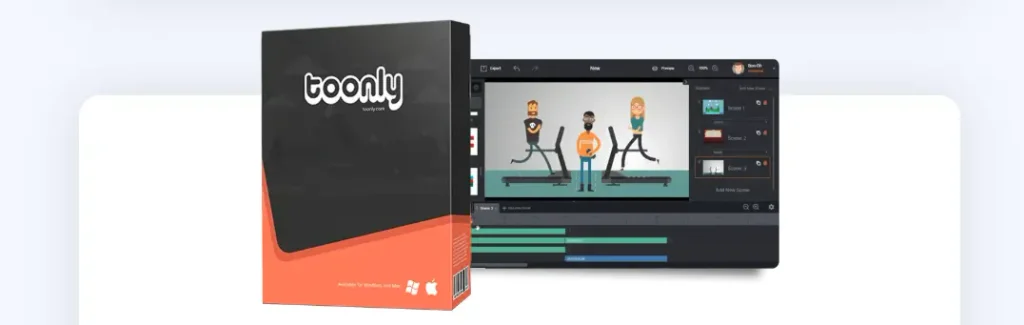
- Toonly: A 2D vector explainer video software designed around colorful cartoon characters, multi-pose animations, pre-built background scenes, and full-color props.
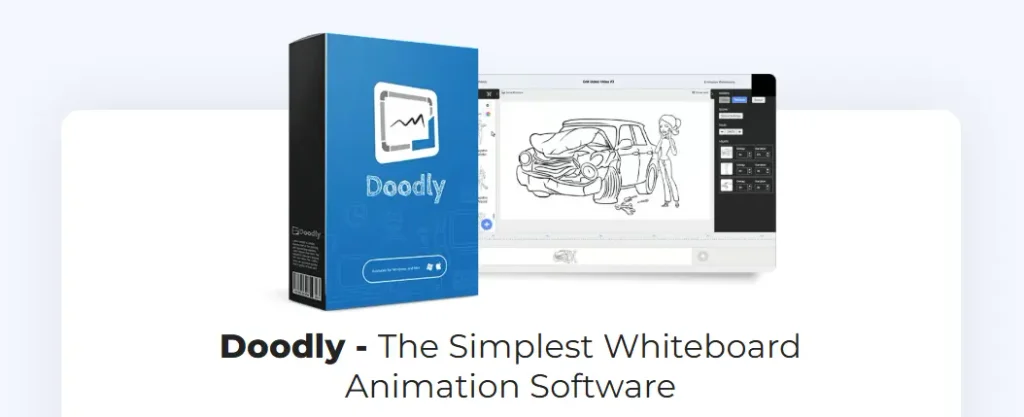
- Doodly: A whiteboard animation software (hand-sketch/doodle video maker) designed to simulate human hands drawing images, text, & custom graphics across whiteboards, glassboards, chalkboards, & green screens.
Key Takeaway: Under current Voomly Cloud subscription models ($49/mo Standard or $79/mo Enterprise), subscribing to the ecosystem gives you access to both Toonly & Doodly, alongside companion marketing tools like Talkia (AI voiceovers), Pyks, & People Builder.
2. Head-to-Head Comparison: Feature Metrics
| Feature / Metric | Toonly (Standard / Enterprise) | Doodly (Standard / Enterprise) |
| Primary Visual Style | 2D Cartoon Explainer Videos | Whiteboard / Hand-Drawn Sketch Animation |
| Characters Included | 30 / 82 (with 17 to 30 actions/poses) | 1,164 / 3,959 doodle characters |
| Props Library | 1,058 / 2,024 props | 1,620 / 3,341 props |
| Background Canvases | 71 / 139 cartoon environments | Whiteboard, Chalkboard, Glassboard, Green Screen, Custom |
| Custom Draw Paths | N/A (Uses slide, fade, or zoom effects) | SmartDraw Technology (Custom SVG path drawing) |
| H& Styles | N/A | 140+ real human hand styles (right & left-handed) |
| Transitions & Animations | 21 / 101 scene transitions, 3-5 text FX | Custom draw speeds, camera panning, zooming |
| Offline Capability | ✅ Can build scenes offline | ❌ Requires active internet connection |
| Lip-Syncing Capabilities | Basic sync with imported Talkia audio | No automatic lip-sync (drawing focused) |
| Export Formats & Quality | MP4, MKV, OGV, WebM (Up to 4K resolution) | MP4, MKV, OGV, WebM (Up to 1080p resolution) |
| Pricing Model | Voomly Cloud ($49/mo or $79/mo) | Voomly Cloud ($49/mo or $79/mo) |
3. Deep Dive into Key Differences
User Interface & Ease of Use
- Toonly: Features a sleek timeline with separate lanes for backgrounds, characters, props, voiceovers, & background music. Users drag assets into a scene, assign an action pose (e.g., typing, waving, sitting), & set transition timing.
- Doodly: Uses a canvas-first layout. When an asset or custom image is placed on the canvas, Doodly automatically assigns an animated hand to draw the outer lines & inner fills.
Asset Customization & Custom Uploads
- Toonly: Allows custom PNG, JPG, & GIF imports. Custom images appear via motion paths (sliding in or fading) rather than line-by-line drawing.
- Doodly: Allows SVG, PNG, & JPG uploads. Using its SmartDraw Technology, creators can draw custom point-to-point paths on imported logos or illustrations so the software draws them accurately on screen.
Audio & Multimedia Integration
- Toonly: Supports dual-track audio (voiceover narration + royalty-free background tracks), lip-sync options via integrated audio files, & scene transitions.
- Doodly: Includes embedded real-time voiceover recording directly into the timeline, matching voice sync with draw-speed adjustments.
4. Pricing & Value for Money
Voomly offers unified billing for both Toonly & Doodly across two primary subscription tiers:
Voomly Cloud Pricing Tiers
├── Standard Plan ($49/mo or $490/yr billed annually – 16% discount)
│ ├── Access to Toonly Standard (30 Characters, 1,058 Props, 71 Backgrounds)
│ ├── Access to Doodly Standard (1,164 Characters, 1,620 Props, 150 Music Tracks)
│ └── Includes Voomly, Talkia, Pyks, People Builder
└── Enterprise / Pro Plan ($79/mo or $790/yr billed annually – 16% discount)
├── Access to Toonly Enterprise (82 Characters, 2,024 Props, 139 Backgrounds, 101 Transitions)
├── Access to Doodly Enterprise (3,959 Characters, 3,341 Props, 250 Music Tracks)
└── Includes Doodly Club & Toonly Club (Monthly trending assets at no extra cost)
Guarantee: Both platforms offer a 30-day money-back guarantee on initial purchases. Commercial rights are included on paid plans, allowing you to create videos for clients or monetized YouTube channels.
5. Pros & Cons Matrix
Toonly
- Pros:
- Ideal for colorful, character-driven storytelling & sales funnels.
- Desktop application operates offline.
- Extensive library of scene transitions (101 in Enterprise) & animated poses.
- Clean, modern timeline editing UI.
- Cons:
- Higher ongoing subscription cost if you only need a single short video.
- Application rendering times can slow down during heavy asset multi-layering.
Doodly
- Pros:
- Specialized whiteboard, chalkboard, glassboard, & green-screen drawing visual style.
- SmartDraw Technology creates custom drawing paths for imported vector artwork.
- 140+ diverse hand styles (male, female, various skin tones, left/right-handed).
- Excellent for educational tutorials, concepts, & Video Sales Letters (VSLs).
- Cons:
- Requires an active internet connection to load online image libraries.
- Color doodle packs require Enterprise level or additional add-on access.
- Limited to 1080p resolution exports.
6. Top Alternatives: Toonly vs. Doodly vs. Competitors
If recurring subscription costs or specific feature sets don’t align with your workflow, consider these top market alternatives:
1. CreateStudio ($67 One-Time Purchase)
- Best Overall Alternative: Offers both 2D & 3D animated character workflows, whiteboard drawing effects, motion graphics, & video editing tools for a single one-time fee.
2. Mango Animation Maker (Lifetime License Option)
- Best for Background Flexibility: Features a free plan (5 screens) & lifetime license options. Supports multiple backgrounds per scene, animated charts/graphs, formula editors, & direct GIF publishing.
3. Vyond & Animaker
- Best for Enterprise & Studio Workflows: High-end cloud animation suites offering advanced lip-syncing, character customization, & team collaboration controls.
Feature Comparison: Toonly vs. Doodly vs. Mango Animation Maker vs. CreateStudio
| Feature | Toonly | Doodly | Mango Animate | CreateStudio |
| Pricing Model | Monthly / Annual | Monthly / Annual | Lifetime Option | One-Time / Subscription |
| Free Version | ❌ (30-day refund) | ❌ (30-day refund) | ✅ (Free limited plan) | ❌ (30-day refund) |
| Animation Styles | 2D Cartoon | Whiteboard / Sketch | 2D Cartoon & Whiteboard | 2D, 3D & Whiteboard |
| H&-Drawn Effects | ❌ | ✅ | ✅ | ✅ |
| Multiple Backgrounds / Scene | ❌ | ❌ | ✅ | ✅ |
| Animated Charts / Graphs | ❌ | ❌ | ✅ | ✅ |
| GIF Export | ❌ | ❌ | ✅ | ✅ |
7. Should You Buy Software or Hire a Freelancer?
Investing in software subscriptions like Voomly Cloud makes long-term financial sense if you produce recurring marketing content. However, hiring a freelance animator on platforms like Fiverr or working with a production agency is often the smarter choice in these scenarios:
- One-Off Video Requirements: If you only need 1 or 2 explainer videos for a landing page, paying $50–$150 to a skilled freelancer avoids the learning curve & subscription setup.
- Tight Turnaround Times: Experienced video creators can execute scriptwriting, voiceover sync, & timeline assembly faster than a beginner learning scene timing.
- High-End Customization: If your video requires custom brand illustration, complex sound design, or bespoke character rigging outside default template libraries.
8. Technical Specifications & Customer Support
Minimum System Requirements
Both applications run natively on desktop operating systems with the following requirements:
- Operating System: Windows 7 or higher (32-bit or 64-bit) / macOS 10.10 (Yosemite) or higher.
- Hardware: Minimum 4GB RAM (8GB+ recommended for faster rendering), display resolution 1280×800 or higher, & stable storage space for asset caching.
Customer Care Channels
- Toonly Support: Knowledge base, official Facebook user group, video training tutorials, & email ticketing (support@toonly.com).
- Doodly Support: Knowledge base, live chat support on sales pages, community forums, & email support (support@doodly.com).
9. Final Verdict: Which Software Should You Choose?
Choose Toonly if:
- You are creating 2D cartoon explainer videos, product demos, social media video ads, or brand storytelling campaigns.
- Your narrative relies on animated character actions, expressive poses, scene transitions, & colorful environments.
Choose Doodly if:
- You are building whiteboard educational lessons, training webinars, how-to tutorials, step-by-step concept explanations, or long-form Video Sales Letters (VSLs).
- You want the viewer’s focus tied directly to progressive drawing paths, & writing simulation, & doodle-style visuals.
Choose an Alternative (CreateStudio or Mango Animate) if:
- You want to avoid monthly subscription fees, require 3D character options, or need built-in animated chart generators & GIF publishing capabilities.
Frequently Asked Questions (FAQs)
Q: Is Toonly the same as Doodly?
A: No. While both are owned by Voomly & share a similar interface, Toonly creates colorful 2D cartoon explainer videos, whereas Doodly creates hand-drawn whiteboard animations.
Q: Can I use Toonly & Doodly videos for commercial client projects?
A: Yes. Commercial usage rights are included with paid Voomly Cloud plans, allowing you to sell videos to clients, use them in paid ads, or publish them on monetized channels.
Q: Do Toonly or Doodly offer a free trial?
A: Neither software offers a traditional free trial. However, both provide a 30-day money-back guarantee, allowing you to test the software risk-free.
Q: Can I import custom voiceovers & background music?
A: Yes. Both platforms allow you to record audio directly inside the software or upload pre-recorded MP3/WAV files for voiceovers & background music.
Q: Does Doodly require an active internet connection?
A: Yes. Doodly requires internet access to render & stream vector graphic libraries from its servers. Toonly can be operated offline once initial software files are downloaded.