
Toonly is a cartoon video maker that lets you build animated explainer videos by dragging & dropping characters, backgrounds & props. You don’t draw anything and you don’t need editing skills. If you have ever wanted a short animated video for your business but quoted prices from an animator made you wince, this is the kind of tool people point you to.
I have read through Toonly’s own site, its pricing pages and a pile of user reviews to put this together. I have used it myself and did proper research about it, so this is a research-based review, and I will tell you where the sources disagree. That happens a lot with Toonly’s pricing.
My quick take: Toonly is easy and fairly cheap for short, friendly explainers. It gets clunky on longer videos, the art looks a bit dated, and the price is now tied to a bigger software bundle. If you want a 60-second cartoon for a landing page or a social post, it can work. If you want something polished & modern, look elsewhere.
What is Toonly? Overview About the Software
Toonly is explainer video software from Voomly LLC, the same company behind Doodly. Doodly makes whiteboard-style videos where a hand draws on screen. Toonly makes cartoon-style videos with animated characters. It’s now part of Voomly Cloud, Voomly’s bundle of video tools.
Here is how it works. You pick a background, drop in a character, add props, record or upload a voiceover, and set when each thing enters and leaves the scene. Then you export an MP4. Toonly installs as a program on a Mac or Windows computer, so it isn’t a browser tool.
The company says it suits small business owners, marketers, agencies, trainers, HR teams, e-commerce sellers & nonprofits, especially people with no design background. That is marketing talk, but the core idea holds up. The tool is built for people who are not animators.
Best for: short explainer videos, product intros, training clips & social posts.
Not great for: long videos, polished brand films, or anything where the art style has to look current.
Toonly Software: Key Features Explanation
Here is what you get, based on Toonly’s own site and what reviewers say about using it.
Characters
Toonly lists 200 character images, made up of 10 characters with 20 poses each. You switch between poses to make a character look like they are talking, pointing or reacting. Users like the range of poses. They also say the cast feels limited, with few animals and not much variety. The art is flat & simple, and some users call it dated.
Backgrounds, scenes & props
You get 81 backgrounds & scenes plus hundreds of props. There are also premade scenes that already combine a background, characters & props, so you can start from something instead of a blank screen. Some users said the image library feels small, which matches the number.
Voiceover & lip-sync
You can record a voiceover inside the app or upload your own audio. Toonly can also match a character’s mouth to your audio. Reviewers on Capterra & Software Advice liked the lip-sync, though at least one person found it hard to set up. If you want text-to-speech, that comes from a separate tool called Talkia, which sits in the Voomly bundle.
Music
There are 20 royalty-free music tracks, and you can upload your own.
Animation & timing
Every item has entrance & exit animations, and you build the video scene by scene. That is simple, but it’s also manual. There is no real template system that builds a video for you, and I have observed limits on scene timing.
Export
Exports are unlimited MP4 files. You can pick 480p, 720p or a custom size, from 24 to 60 frames per second. Toonly’s own page doesn’t mention 1080p, so check before you assume it.
Extras
• Install it on several Macs or PCs
• Free feature updates
• Tutorials, which reviewers call helpful
What’s missing
• No automatic subtitles, according to reviewers
• English only, according to one Capterra reviewer
• Slowdowns on videos longer than about a minute, reported by several reviewers
Also Read – Toonly vs. Doodly: Which Animation Software Is Right for You in 2026?
Toonly pricing
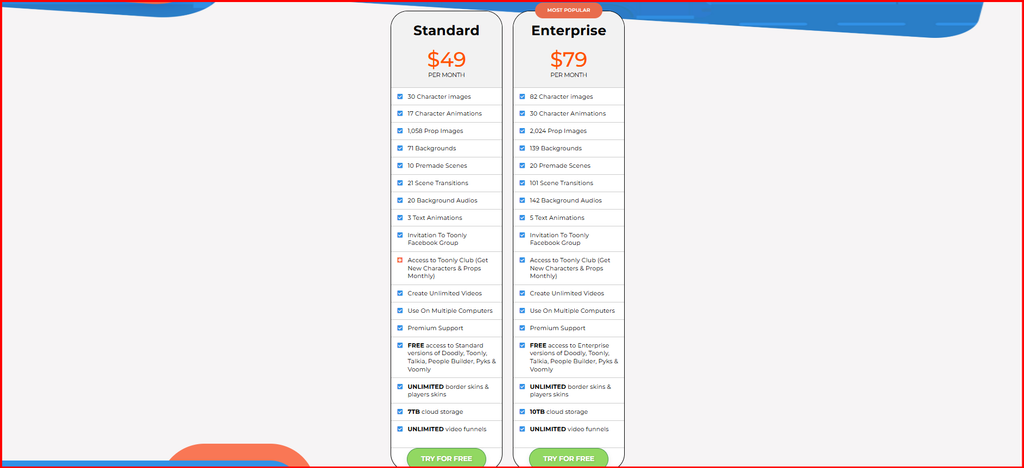
This is the messy part. Toonly used to sell as its own product, and some review sites still list those old prices. Today it’s bundled into Voomly Cloud. Here is what I found:
| Plan | Price | What you get |
| Voomly Cloud (monthly) | $49 a month | Standard Toonly & Doodly, plus Talkia, People Builder, Pyks & Voomly. 7TB cloud storage |
| Voomly Cloud (yearly) | $490 a year, about $41 a month | Same as above |
| Voomly Pro (monthly) | $79 a month | Enterprise versions of the same tools. 10TB storage |
| Voomly Pro (yearly) | $790 a year, about $66 a month | Same as above |
| Old standalone Standard | About $39 a month | Listed on Capterra and Software Advice. Likely out of date |
| Old standalone Enterprise | About $69 a month | Listed on Capterra. Likely out of date |
The plans below Cloud (Light, Basic & Plus) don’t include Toonly. The Voomly pricing page doesn’t explain how Standard differs from Enterprise.
Free trial & refunds. Voomly offers a 14-day free trial on its paid plans, and the pricing page says you can get a full refund if you cancel within 30 days. Toonly’s own site also mentions a 30-day money-back guarantee, handled by email. One Capterra reviewer said a refund request went unanswered because the support email didn’t work. That is one person, but save your receipts.
Watch out for the promo banners. Toonly’s homepage shows a banner saying “Normally $468/year, Today ONLY $67,” labeled as a Doodly deal. It doesn’t say whether it covers Toonly. A review site also mentions a roughly $67 one-time price. Don’t trust either until you see it at checkout. The Voomly pricing page lists no one-time prices.
Is it worth it? At about $41 a month on the yearly Cloud plan, you are paying for a bundle. If you would use Doodly too, that helps. If you only want cartoon videos, one user called it expensive next to similar tools, and a Pexo review says the same about paying for a whole suite to get one tool.
Toonly Software Pros & Cons
User ratings are decent. Capterra shows 4.3 out of 5 from 31 reviews, with 84% positive. Software Advice shows the same score and breaks it down: 17 five-star, 9 four-star, 3 three-star and 2 one-star ratings. Reviewers scored it lowest on features, at 3.9.
Pros of Using Toonly
• Easy to learn. Users say a beginner can make a decent animation with little effort.
• No design skills needed.
• Lip-sync that most users liked.
• A good spread of poses per character.
• Cheaper than hiring an animator.
• Helpful tutorials and, according to several reviewers, good support.
• Unlimited exports & free updates.
• Works offline once installed.
Cons of Using Toonly
• Flat, dated-looking characters.
• Small character & image library.
• Slows down or freezes on videos longer than about a minute.
• Every scene is built by hand.
• Movement is limited to preset poses, so gestures can look choppy.
• No automatic subtitles.
• Price is tied to a bundle you may not need.
• Confusing pricing across review sites.
• A reported refund problem from at least one customer.
One note on sources. Pexo’s review lists mention lots of cons, but Pexo sells a competing tool, so I only used points that other reviewers back up.
Also Read – 10 Best Free 3D Animation Software for Beginners in 2026
Who should use Toonly (and who should skip it)
Toonly makes sense if you:
• Need a 30 to 60 second cartoon explainer for a website or ad
• Run a small business and want to skip hiring an animator
• Make training or onboarding clips and don’t mind building scenes by hand
• Also want Doodly and the other Voomly tools
• Like installing software on your own computer
Skip it if you:
• Want modern, polished visuals for a brand video
• Make long videos, since the editor reportedly lags past about a minute
• Need subtitles, other languages or a lot of custom characters
• Only want one tool and don’t want a bundle
• Hate manual editing and want AI to build the video for you
Toonly vs the Alternatives Software Available Online
| Tool | Style | Price I found | Best for |
| Toonly | Cartoon characters, drag & drop | $49 a month (Cloud bundle) | Short, simple explainers |
| Doodly | Whiteboard-style drawing | Included in Voomly Cloud | Hand-drawn explainers |
| Vyond | Business animation | $99 a month (Starter) | Teams & larger companies |
| Powtoon | Presentation-style animation | Check the site | Slides & internal comms |
| Animaker | Mixed animation styles | Check the site | Budget animation with more options |
The Vyond price comes from Techjockey and may have changed. I didn’t pull current Powtoon or Animaker prices, so look at their sites. On Techjockey’s numbers, Vyond costs about double what Toonly does. Toonly scored higher for ease of use there (4.5 vs 4.1), though both products had very few ratings.
How to Try Toonly Without Wasting Money
Since the pricing is confusing and the art style is a matter of taste, test it before you commit. Here’s a simple plan.
1. Start the 14-day free trial from Voomly’s pricing page. Check whether it asks for a card, because the page doesn’t say.
2. Pick the Cloud plan, since that is the cheapest one that includes Toonly.
3. Make one real video, not a test clip. Use a script you would actually publish, around 45 to 60 seconds.
4. Export it at the size you need and watch it on a phone. Characters that look fine on a monitor can feel small on a screen.
5. Check whether the editor lags as you add scenes. Reviewers say it slows down past about a minute, and you want to see that for yourself.
6. Ask yourself if the characters fit your brand. If they feel too cartoonish or old-fashioned, that is your answer.
7. Set a reminder for day 25. If you are not sure, cancel before the 30-day refund window closes.
A few other tips from my side:
• Reuse props & characters across scenes to save editing time.
• Record your voiceover first, then build the scenes around it. Timing is much easier that way.
• Keep videos short and split long topics into a series.
• If you need subtitles, plan on adding them in a separate editor.
My Final Verdict
Toonly does one job: it gets a non-designer to a finished cartoon video fast. For short explainers, it’s a reasonable pick, and the lip-sync & simple pose system are the parts people like most.
The weak spots are real, though. The art looks dated, long videos reportedly lag, and you build every scene by hand. The price has also changed shape. You are no longer buying a cheap standalone tool. You are buying into Voomly Cloud at $49 a month, or about $41 a month if you pay yearly.
Here is how I would decide. If you would use Doodly as well, the bundle is a fair deal. If you only want cartoons and care how they look, try the free trial first, make one real video, and see if the characters fit your brand. If they don’t, you have lost nothing. Just cancel inside the refund window, and keep a copy of your receipt and the support email in case you need it.
My rating: 3.5 out of 5. Easy and affordable enough for simple jobs, held back by the art style, the lag and the muddy pricing.